Thursday, August 31, 2017

Javascript Modules - Overview

There are basically two runtimes for Javascript:
1. Client-side: Browser
2. Server-side: NodeJs

Client-Side:
Basically a webpage contains tags which will be parsed by a webbrowser with the help of its various components - HTML Parser, CSS parser and JS Engine etc. How Browser executes Javascript is our area of focus while discussing about Javascript modules.

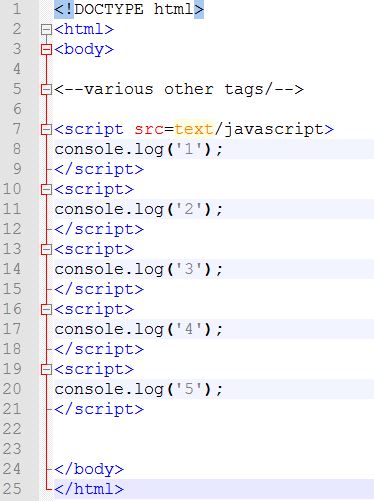
Consider the following html:


The console of the browser when this page is loades shows the following output:
1
2
3
4
5
...

Means..the browser executes the script tags in a sequential fashion.

Consider another sample showing only the script tags:

Lets see how Browser loads the above html:
Browser, executes script tags in a sequential fashion as explained earlier. And if there are any tags that contain downloadable libraries from CDNs or scripts from Server, it downloads them asynchronously but the execution of the same will be sequential(in the order of encountered).
Meaning...once all the CDN libraries(jquery, bootstrap, backbone etc) are downloaded, the js code in 1.js, 2.js, 3.js will be executed respectively. But, sometimes, to speed up the execution, browser executes the scripts asynchronously.

The disadvantages of the approach:
1. Polluting global namespace:
If boht 1.js, 2.js contain a variable named 'a', a scope-conflict occurs. This is called polluting namespace.
2. Dependency: What if a browser executes scripts asynchronously(parallelly). Imagine executing 2.js while 1.js is still downloading or any other CDNs are downloading. And the problem arises if 2.js contain a jquery or backbone js function which is still loading.


To overcome those issues two approaches are defined:
a) CommonJS: ServerSide..NodeJS..Synchronous
b) Asynchronous Module Definition - AMD - Client side - Require.js - Asynchronous
c) ECMA's standard module spec

RequireJS:
This contains 3 basic building blocks:
1. require : Using this we can tell execution-environment(browser) of all the dependencies(js files) that it needs to load before execuing a piece of code.
2. define : Using this we can instruct browser of all the dependencies that the piece of code needs and register the current file(in which the define statement present) with RequireJS so that it can be used in require statement.
3. configure:  Configure shortnames for accessing various js files in different folders.

Essential Software Programmer Toolkit and Terminology

List of most frequently used tools by programmers:

Online code formatters for SQL, JSON, Java
Online Validators
Postman, POSTman Interceptor
SoapUI
Keyboard Shortcuts
Shell/Bash commands
Hostfile for network issues
WinSCP - For server logs and various other tasks
Notepad++ and its styler
JUnit
wkhtmltopdf
Eclipse
Netbeans
IntelliJ
Fiddler
Cntlm
TinyMCE - RichText editor

Terms:
Mobile:
ios: AppStore
TestFlight

Android:
SDKManager
FeatureFlag concept

Domain - Financial

Personetics lib

Native
SPA

APIs:
Service Configuration
Service orchestration
Integration


Friday, August 25, 2017

Comparing Android and WebBrowser

Comparing Android and WebBrowser:
Normally, users or developers compare Android with iOS or any other mobile based operating system. But here, I am not making a feature comparison. As part of my job, I do develop both mobile and web applications. Based on my past experience with it, I tried to create an analogy of both the systems to help myself quickly visualize where exactly the bare minimum components present in both the models fit along in the specific view of front-end application. And below what I could come up with.
Please mind that, though there are number of ways both are different, I made this comparison to ease my development activity.


Project Structure: Android vs Web Browser


From the above Figure...

Systems or the RunTimes: A(ny) WebBrowser has components like - CSS Parser, HTML parser, JavaScript engine and many more - to render web pages to user on desktop or a mobile screen. Android,though an Operating system that does numerous activities compared to a WebBrowser, also internally uses few components to display the content on the Mobile or Tablet screen. These internal components specific to each system.

View or User Interface:
In case of Android, layouts and the corresponding styling are defined in .xml files which are parsed by Android's internal components(described above) to build UI for the user. Similarly, webpages are written in HTML files(a markup language comparable to XML) and their styling is defined in .xml files. A WebBrowser reads these html and xml code, parses them, builds the DOM tree and finally renders it to user.

JavaScript vs Java:
The webpages or mobile layouts(Ref Mobile Screens in Fig) are static in nature. They don't have any knowledge on how to respond to events, perform network related operations such as sending request to server and process the response. JavaScript in case of WebBrowser and Java in Android are for the rescue. Developer specifies the code to handle all the User events, system events and network actions. They basically provide the dynamic capabilities to otherwise static pages.
WebBrowser has JavaScript engines to read and process the javascript and Android has DVM(Dalvik Virtual Machine) to compile and run Java code.

Static Content:
Any software project should contain static content such as images etc to be rendered to the user. Android and WebBrowser are no different. They too contain resources folder with all sorts of resources required by project.

Manifest file:
The only difference between Android and WebBrowser is this. The manifest file present in Android app but not in WebApplications. Main reason is that After an android app is developed, it has to be installed in the client machine(mobile or tablet or IOT)that runs on Android OS. In order to let Android OS know which class that it needs to start on the startup and which folders contain which data etc..all these details are specified in a Manifest.xml file. This is more of a configuration file. Where as in case of WebApplication...this is deployed on the server and client machine which uses browser does not need to have the frontend htmls to be installed. Rather browser sends a request to the server that and server responds with the html+css+javascript code back to the browser and it then processes. Hence, a manifest file is not required in case of webbrowser.

Friday, August 18, 2017

EHS Practices

Emerging Health System(EHS):
URL Mapping:
A completely different implementation that I came across. The system uses various front controllers(Dispatcher servlets) such as
Ajax Servlet
Upload Servlet
Image Servlet
Web Servlet: Main servlet for dispatching requests to other EJB objects.

All other servlets except WebServlet have the similar and self-explanatory task of dispatching requests.
Web Servlet(DADA Servlet): This instead of mapping requests through a config file(eg: xml), approach uses a combination of Java's Reflections and Database Table to dynamically execute methods on classes based on request parameters.

The solution is designed in such a way that the requests from front-end contain a static path eg: http://Host:port/ehs/ehsdadaservlet along with parameters.
The URL: /ehs/ehsdadaservlet is mapped to Web Servlet(Dispatcher).
WebServlet then invokes a ProcessHandler by passing it the HttpRequest for further processing.
The request-parameters contain information of which EJB and its method need to be invoked.
The ProcessHandler takes in the request, extracts the parameters, validates the values against database table to fetch appropriate class and its method. And then it invokes the classes and method dynamically with the help of Reflections.

Here the process handlers cannot be called as Controller as in MVC since they don't dispatch back the response.

Front End:
The development of frontend webpages is done via a software called ToolKit. It has a GUI that contains all UI elements which can be dragged and dropped to design webpages and can hook JavaScript methods to events of UI elements.
Once designed, the whole logic is stored in database tables. There are UI Process-handler classes which dynamically construct HTML pages(View) extracting from db, attach the XML data(Model) received from EJBs and render them back to client.

DAO and Service layers:
As part of persistence, no Hibernate or ORM tool is used rather they directly invoke Stored procedures from Service layer bypassing DAO layer.
A tool called Query builder(Similar to HQL) is used to avoid directly coding SQL queries. The objects compatible to be written in QueryBuilder queries need to be generated automatically by another in-house tool.

MasterData Managment:
Any application(Web based or desktop) that interracts with Users, should have the master data configured in the database and corresponding UI to pull and save data back-and-forth.
The practice followed in this project is somewhat less niche. In the previous projects, we used to maintain the config data in seperate tables here they maintain all the data in a single table calling it ControlCodes.

Eg:
Visa Meta data: will be in a table with Country, Visa Name, Class, Sub class etc
Address related meta data: Country, City, State, PostalCodes, etc
Seperate UI is designed to maintain this data.

But here in EHS, they configure all the data in a single table and maintain a single UI to manipulate the data. Though the adavantage of having single UI for whole management, lot of wastage will be there in terms many table columns being NULLs.

Imagine maintaining Visa metadata, Address meta data, any other configuration data in a single table. Though the data might be less, lot of columns will be NULLs resulting wastage of storage space.

These practices are highly unmaintainable in the long run.


Request Mapping Techniques in Web Applications - J2EE

URL mapping techniques:
Request mapping or the URL mapping is the most important part of any web application development.
Following are the types of techniques used in projects that I am aware of.

Finnacle:
All sorts of URL mapping is done at the Filter level. Filters are normally pre-processing constructs stand before Dispatcher Servlets in the request path.
But, Finnacle(a financial product) provided filters with an additional capability of url mapping to servlets.

Emerging Health System(EHS):
A completely different implementation that I came across. The system uses various front controllers(Dispatcher servlets) such as
Ajax Servlet
Upload Servlet
Image Servlet
Web Servlet: Main servlet for dispatching requests to other EJB objects.

All other servlets except WebServlet have the similar and self-explanatory task of dispatching requests.
Web Servlet(DADA Servlet): This instead of mapping requests through a config file(eg: xml), approach uses a combination of Java's Reflections and Database Table to dynamically execute methods on classes based on request parameters.

The solution is designed in such a way that the requests from front-end contain a static path eg: http://Host:port/ehs/ehsdadaservlet along with parameters.
The URL: /ehs/ehsdadaservlet is mapped to Web Servlet(Dispatcher).
WebServlet then invokes a ProcessHandler by passing it the HttpRequest for further processing.
The request-parameters contain information of which EJB and its method need to be invoked.
The ProcessHandler takes in the request, extracts the parameters, validates the values against database table to fetch appropriate class and its method. And then it invokes the classes and method dynamically with the help of Reflections.

Here the process handlers cannot be called as Controllers as in MVC pattern, since they don't process response and pick view to dispatch back the response.

SpringMVC:
Any springMVC web-application takes advantage of spring-container's @RequestMapping annotations or XML config files to map the request to corresponding controller methods. Dispatcher servlet only dispatches the requests to these controllers.

Friday, August 11, 2017

Theory behind wait(), notify() and notifyAll()

Multithreading in java is implemented with concept of Object and its Monitor.

Imagine monitor as a flag(or) register. JVM manages this.


If multiple threads need to access or share the object, first a thread has to acquire lock on the monitor of the object. Once a thread acquires a lock, no other thread can access that object. This can be done by using "synchronized" keyword in Java.

So far, a thread acquires a lock but how it notifies other threads to acquire a lock on the object?

wait(), notify() and notifyAll()
How it works?

Eg: Produced and Consumer Problem

A Queue object with size field is being shared by Producer and Consumer threads.

class Producer{
run()
{
synchronized(msg){
  if(msg.size =  max)
      wait();
  msg.push();
  notifyAll();
}
}
}

class Consumer{
run()
{
synchronized(msg){
  if(msg.size ==  min)
      wait();
  msg.pop();
  notifyAll();
}
}
}

class ProducerConsumerDemo(){
    public static void main(String arg){
       Queue msg = new Queue();
             msg.size = 10;

Producer p = new Producer();
Consumer c = new Consumer();

p.start();
c.start();
       

   }
}


How it works:
Lets say P acquires lock on msg first. P starts and C starts. Since, P acquired, C cant enter its synchronized block. P starts in its synchronized block. Since msg is empty at first, P push() happens. msg has one element. P calls notifyAll(). Means it exits the synchronized block and releases lock on msg. C starts and enters synchronized block. C consumer one element of msg. Now msg has zero elements. C calls notifyAll()--> Means C releases lock. C exits the synchronized block. Now, lets say C got the lock. C enters synchronized block but just waits and releases the lock. Now P enters the synchronized block. P produces. P notifies. P releases the lock. P exits the synchronized block...the story repeats.

Important derivations:
wait(): When a thread calls wait() in a synchronized block,
1) It does not leave the synchronized block
2) It releases the lock
3) It will be in wait/blocked state

When another thread notifies, it continues execution from where it started waiting. Means, line of code after wait() statement.

Notify: When a thread calls notify() in a synchronized block
1) It does not leave the synchronized block if notify() is not the last statement in synchronized block. It continues execution of statements after this. During this also, no other object acquires Lock. Another thread acquires lock, if the current thread exits synchronized block.

2) It leaves synchronized block if notify() is last statement in the synchronized block
3) It releases the lcok[ONly after exiting the synchronized block]

This thread needs to acquire lock again if it needs to execute.

sleep(): Does not release lock. It pauses main() thread.


wait
    synchronized(obj){
                     ---------
                     ---------
                     ---------
                     wait();  // At this point, thread goes to wait state.
                     ---------  // Form this point will be continued execution after notified by other threads
                     ---------
                     ---------
                     ---------

}   // Synchronized end


notifyAll
        synchronized(obj){
                     ---------
                     ---------
                     ---------
                     notifyAll(); // At this point, thread might release or might not release lock based on next 
                     [---------         lines of code exist or not.
                     ---------          If next line exist, it does not release the lock
                     ---------]         If next line does not exist, it releases the lock

} //End of synchronized block


Note: In a syncrhonized block, both wait() and notify() should exist. Or at least notify() has to exist.

Multi Threading Notes - Java

1)Thread States: Running, New, Runnable, Blocked/Waiting, Dead

2)Context Switching: Process of storing and restoring CPU states while switching between threads

3)Join: Using this method, we can ensure serialization of thread execution.

Eg: T1, T2, T3

{
T3.start();
T3.join();
T2.Start();
T2.join();
T1.start();

}

IN the above program, JVM first encounters T3.start(). It then starts thread T3. Then parallelly it tries to execute next statement, but it encountes T3.join(), indicating JVM should continue with T3 and go to next statement until T3 is completed. Then, it starts T2...

O/P:
T3 Starts

T3 Ends
T2 Starts
T2 Ends
T1 Starts
T1 Ends


4) Difference between synchronized block and synchronized method?
Using synchronized block { } -> we can partially block some lines of a method but not the whole method. Whereas in synchronized method, the whole method will be blocked.

5) Volatile, Transient, Temporal, Atomic

6) Thread Dump: GIves info about active threads. Used to analyse the deadlock situation

7) How to prevent deadlock?
Lock ordering
Lock timeout
Dead lock detection

9) Concurrency control methods?
  synchronized block - wait(), notify()
  Lock api
  Concurrent data structure/ collection
  Volatile, Atomic
  Immutable Objects

How J2EE components work together in any Container - Spring or Application Server

In a Spring+Jersey+Hibernate RESTful webapplication, we can spot various J2EE components - JTA, JPA, Java Bean Validation, JSON-B API for B...