Thursday, August 31, 2017

Javascript Modules - Overview

There are basically two runtimes for Javascript:
1. Client-side: Browser
2. Server-side: NodeJs

Client-Side:
Basically a webpage contains tags which will be parsed by a webbrowser with the help of its various components - HTML Parser, CSS parser and JS Engine etc. How Browser executes Javascript is our area of focus while discussing about Javascript modules.

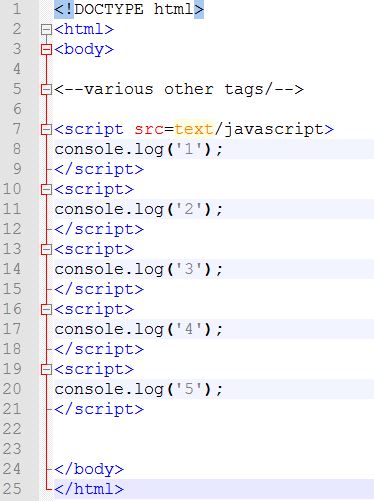
Consider the following html:


The console of the browser when this page is loades shows the following output:
1
2
3
4
5
...

Means..the browser executes the script tags in a sequential fashion.

Consider another sample showing only the script tags:

Lets see how Browser loads the above html:
Browser, executes script tags in a sequential fashion as explained earlier. And if there are any tags that contain downloadable libraries from CDNs or scripts from Server, it downloads them asynchronously but the execution of the same will be sequential(in the order of encountered).
Meaning...once all the CDN libraries(jquery, bootstrap, backbone etc) are downloaded, the js code in 1.js, 2.js, 3.js will be executed respectively. But, sometimes, to speed up the execution, browser executes the scripts asynchronously.

The disadvantages of the approach:
1. Polluting global namespace:
If boht 1.js, 2.js contain a variable named 'a', a scope-conflict occurs. This is called polluting namespace.
2. Dependency: What if a browser executes scripts asynchronously(parallelly). Imagine executing 2.js while 1.js is still downloading or any other CDNs are downloading. And the problem arises if 2.js contain a jquery or backbone js function which is still loading.


To overcome those issues two approaches are defined:
a) CommonJS: ServerSide..NodeJS..Synchronous
b) Asynchronous Module Definition - AMD - Client side - Require.js - Asynchronous
c) ECMA's standard module spec

RequireJS:
This contains 3 basic building blocks:
1. require : Using this we can tell execution-environment(browser) of all the dependencies(js files) that it needs to load before execuing a piece of code.
2. define : Using this we can instruct browser of all the dependencies that the piece of code needs and register the current file(in which the define statement present) with RequireJS so that it can be used in require statement.
3. configure:  Configure shortnames for accessing various js files in different folders.

Essential Software Programmer Toolkit and Terminology

List of most frequently used tools by programmers:

Online code formatters for SQL, JSON, Java
Online Validators
Postman, POSTman Interceptor
SoapUI
Keyboard Shortcuts
Shell/Bash commands
Hostfile for network issues
WinSCP - For server logs and various other tasks
Notepad++ and its styler
JUnit
wkhtmltopdf
Eclipse
Netbeans
IntelliJ
Fiddler
Cntlm
TinyMCE - RichText editor

Terms:
Mobile:
ios: AppStore
TestFlight

Android:
SDKManager
FeatureFlag concept

Domain - Financial

Personetics lib

Native
SPA

APIs:
Service Configuration
Service orchestration
Integration


Friday, August 25, 2017

Comparing Android and WebBrowser

Comparing Android and WebBrowser:
Normally, users or developers compare Android with iOS or any other mobile based operating system. But here, I am not making a feature comparison. As part of my job, I do develop both mobile and web applications. Based on my past experience with it, I tried to create an analogy of both the systems to help myself quickly visualize where exactly the bare minimum components present in both the models fit along in the specific view of front-end application. And below what I could come up with.
Please mind that, though there are number of ways both are different, I made this comparison to ease my development activity.


Project Structure: Android vs Web Browser


From the above Figure...

Systems or the RunTimes: A(ny) WebBrowser has components like - CSS Parser, HTML parser, JavaScript engine and many more - to render web pages to user on desktop or a mobile screen. Android,though an Operating system that does numerous activities compared to a WebBrowser, also internally uses few components to display the content on the Mobile or Tablet screen. These internal components specific to each system.

View or User Interface:
In case of Android, layouts and the corresponding styling are defined in .xml files which are parsed by Android's internal components(described above) to build UI for the user. Similarly, webpages are written in HTML files(a markup language comparable to XML) and their styling is defined in .xml files. A WebBrowser reads these html and xml code, parses them, builds the DOM tree and finally renders it to user.

JavaScript vs Java:
The webpages or mobile layouts(Ref Mobile Screens in Fig) are static in nature. They don't have any knowledge on how to respond to events, perform network related operations such as sending request to server and process the response. JavaScript in case of WebBrowser and Java in Android are for the rescue. Developer specifies the code to handle all the User events, system events and network actions. They basically provide the dynamic capabilities to otherwise static pages.
WebBrowser has JavaScript engines to read and process the javascript and Android has DVM(Dalvik Virtual Machine) to compile and run Java code.

Static Content:
Any software project should contain static content such as images etc to be rendered to the user. Android and WebBrowser are no different. They too contain resources folder with all sorts of resources required by project.

Manifest file:
The only difference between Android and WebBrowser is this. The manifest file present in Android app but not in WebApplications. Main reason is that After an android app is developed, it has to be installed in the client machine(mobile or tablet or IOT)that runs on Android OS. In order to let Android OS know which class that it needs to start on the startup and which folders contain which data etc..all these details are specified in a Manifest.xml file. This is more of a configuration file. Where as in case of WebApplication...this is deployed on the server and client machine which uses browser does not need to have the frontend htmls to be installed. Rather browser sends a request to the server that and server responds with the html+css+javascript code back to the browser and it then processes. Hence, a manifest file is not required in case of webbrowser.

Friday, August 18, 2017

EHS Practices

Emerging Health System(EHS):
URL Mapping:
A completely different implementation that I came across. The system uses various front controllers(Dispatcher servlets) such as
Ajax Servlet
Upload Servlet
Image Servlet
Web Servlet: Main servlet for dispatching requests to other EJB objects.

All other servlets except WebServlet have the similar and self-explanatory task of dispatching requests.
Web Servlet(DADA Servlet): This instead of mapping requests through a config file(eg: xml), approach uses a combination of Java's Reflections and Database Table to dynamically execute methods on classes based on request parameters.

The solution is designed in such a way that the requests from front-end contain a static path eg: http://Host:port/ehs/ehsdadaservlet along with parameters.
The URL: /ehs/ehsdadaservlet is mapped to Web Servlet(Dispatcher).
WebServlet then invokes a ProcessHandler by passing it the HttpRequest for further processing.
The request-parameters contain information of which EJB and its method need to be invoked.
The ProcessHandler takes in the request, extracts the parameters, validates the values against database table to fetch appropriate class and its method. And then it invokes the classes and method dynamically with the help of Reflections.

Here the process handlers cannot be called as Controller as in MVC since they don't dispatch back the response.

Front End:
The development of frontend webpages is done via a software called ToolKit. It has a GUI that contains all UI elements which can be dragged and dropped to design webpages and can hook JavaScript methods to events of UI elements.
Once designed, the whole logic is stored in database tables. There are UI Process-handler classes which dynamically construct HTML pages(View) extracting from db, attach the XML data(Model) received from EJBs and render them back to client.

DAO and Service layers:
As part of persistence, no Hibernate or ORM tool is used rather they directly invoke Stored procedures from Service layer bypassing DAO layer.
A tool called Query builder(Similar to HQL) is used to avoid directly coding SQL queries. The objects compatible to be written in QueryBuilder queries need to be generated automatically by another in-house tool.

MasterData Managment:
Any application(Web based or desktop) that interracts with Users, should have the master data configured in the database and corresponding UI to pull and save data back-and-forth.
The practice followed in this project is somewhat less niche. In the previous projects, we used to maintain the config data in seperate tables here they maintain all the data in a single table calling it ControlCodes.

Eg:
Visa Meta data: will be in a table with Country, Visa Name, Class, Sub class etc
Address related meta data: Country, City, State, PostalCodes, etc
Seperate UI is designed to maintain this data.

But here in EHS, they configure all the data in a single table and maintain a single UI to manipulate the data. Though the adavantage of having single UI for whole management, lot of wastage will be there in terms many table columns being NULLs.

Imagine maintaining Visa metadata, Address meta data, any other configuration data in a single table. Though the data might be less, lot of columns will be NULLs resulting wastage of storage space.

These practices are highly unmaintainable in the long run.


Request Mapping Techniques in Web Applications - J2EE

URL mapping techniques:
Request mapping or the URL mapping is the most important part of any web application development.
Following are the types of techniques used in projects that I am aware of.

Finnacle:
All sorts of URL mapping is done at the Filter level. Filters are normally pre-processing constructs stand before Dispatcher Servlets in the request path.
But, Finnacle(a financial product) provided filters with an additional capability of url mapping to servlets.

Emerging Health System(EHS):
A completely different implementation that I came across. The system uses various front controllers(Dispatcher servlets) such as
Ajax Servlet
Upload Servlet
Image Servlet
Web Servlet: Main servlet for dispatching requests to other EJB objects.

All other servlets except WebServlet have the similar and self-explanatory task of dispatching requests.
Web Servlet(DADA Servlet): This instead of mapping requests through a config file(eg: xml), approach uses a combination of Java's Reflections and Database Table to dynamically execute methods on classes based on request parameters.

The solution is designed in such a way that the requests from front-end contain a static path eg: http://Host:port/ehs/ehsdadaservlet along with parameters.
The URL: /ehs/ehsdadaservlet is mapped to Web Servlet(Dispatcher).
WebServlet then invokes a ProcessHandler by passing it the HttpRequest for further processing.
The request-parameters contain information of which EJB and its method need to be invoked.
The ProcessHandler takes in the request, extracts the parameters, validates the values against database table to fetch appropriate class and its method. And then it invokes the classes and method dynamically with the help of Reflections.

Here the process handlers cannot be called as Controllers as in MVC pattern, since they don't process response and pick view to dispatch back the response.

SpringMVC:
Any springMVC web-application takes advantage of spring-container's @RequestMapping annotations or XML config files to map the request to corresponding controller methods. Dispatcher servlet only dispatches the requests to these controllers.

Friday, August 11, 2017

Theory behind wait(), notify() and notifyAll()

Multithreading in java is implemented with concept of Object and its Monitor.

Imagine monitor as a flag(or) register. JVM manages this.


If multiple threads need to access or share the object, first a thread has to acquire lock on the monitor of the object. Once a thread acquires a lock, no other thread can access that object. This can be done by using "synchronized" keyword in Java.

So far, a thread acquires a lock but how it notifies other threads to acquire a lock on the object?

wait(), notify() and notifyAll()
How it works?

Eg: Produced and Consumer Problem

A Queue object with size field is being shared by Producer and Consumer threads.

class Producer{
run()
{
synchronized(msg){
  if(msg.size =  max)
      wait();
  msg.push();
  notifyAll();
}
}
}

class Consumer{
run()
{
synchronized(msg){
  if(msg.size ==  min)
      wait();
  msg.pop();
  notifyAll();
}
}
}

class ProducerConsumerDemo(){
    public static void main(String arg){
       Queue msg = new Queue();
             msg.size = 10;

Producer p = new Producer();
Consumer c = new Consumer();

p.start();
c.start();
       

   }
}


How it works:
Lets say P acquires lock on msg first. P starts and C starts. Since, P acquired, C cant enter its synchronized block. P starts in its synchronized block. Since msg is empty at first, P push() happens. msg has one element. P calls notifyAll(). Means it exits the synchronized block and releases lock on msg. C starts and enters synchronized block. C consumer one element of msg. Now msg has zero elements. C calls notifyAll()--> Means C releases lock. C exits the synchronized block. Now, lets say C got the lock. C enters synchronized block but just waits and releases the lock. Now P enters the synchronized block. P produces. P notifies. P releases the lock. P exits the synchronized block...the story repeats.

Important derivations:
wait(): When a thread calls wait() in a synchronized block,
1) It does not leave the synchronized block
2) It releases the lock
3) It will be in wait/blocked state

When another thread notifies, it continues execution from where it started waiting. Means, line of code after wait() statement.

Notify: When a thread calls notify() in a synchronized block
1) It does not leave the synchronized block if notify() is not the last statement in synchronized block. It continues execution of statements after this. During this also, no other object acquires Lock. Another thread acquires lock, if the current thread exits synchronized block.

2) It leaves synchronized block if notify() is last statement in the synchronized block
3) It releases the lcok[ONly after exiting the synchronized block]

This thread needs to acquire lock again if it needs to execute.

sleep(): Does not release lock. It pauses main() thread.


wait
    synchronized(obj){
                     ---------
                     ---------
                     ---------
                     wait();  // At this point, thread goes to wait state.
                     ---------  // Form this point will be continued execution after notified by other threads
                     ---------
                     ---------
                     ---------

}   // Synchronized end


notifyAll
        synchronized(obj){
                     ---------
                     ---------
                     ---------
                     notifyAll(); // At this point, thread might release or might not release lock based on next 
                     [---------         lines of code exist or not.
                     ---------          If next line exist, it does not release the lock
                     ---------]         If next line does not exist, it releases the lock

} //End of synchronized block


Note: In a syncrhonized block, both wait() and notify() should exist. Or at least notify() has to exist.

Multi Threading Notes - Java

1)Thread States: Running, New, Runnable, Blocked/Waiting, Dead

2)Context Switching: Process of storing and restoring CPU states while switching between threads

3)Join: Using this method, we can ensure serialization of thread execution.

Eg: T1, T2, T3

{
T3.start();
T3.join();
T2.Start();
T2.join();
T1.start();

}

IN the above program, JVM first encounters T3.start(). It then starts thread T3. Then parallelly it tries to execute next statement, but it encountes T3.join(), indicating JVM should continue with T3 and go to next statement until T3 is completed. Then, it starts T2...

O/P:
T3 Starts

T3 Ends
T2 Starts
T2 Ends
T1 Starts
T1 Ends


4) Difference between synchronized block and synchronized method?
Using synchronized block { } -> we can partially block some lines of a method but not the whole method. Whereas in synchronized method, the whole method will be blocked.

5) Volatile, Transient, Temporal, Atomic

6) Thread Dump: GIves info about active threads. Used to analyse the deadlock situation

7) How to prevent deadlock?
Lock ordering
Lock timeout
Dead lock detection

9) Concurrency control methods?
  synchronized block - wait(), notify()
  Lock api
  Concurrent data structure/ collection
  Volatile, Atomic
  Immutable Objects

Java Memory Model


When Threads share objects in Heap, each thread has to acquire lock(a flag that will be set by the JVM upon request from thread) of the object that it wants to use. In case of method area, threads have to acquire lock of *Class to use its static data.

*Class: In Java, there is a class called Class that represents the actual Class template(not the object)

SOAP vs REST

SOAP RESTful
Heavy Weight Light Weight
Highly standardized with a dedicated team looking after the specifications Its just an archtectural style. No specific guidelines or spec
Slow because of High Payload and processing. Both payload and processing are related to guidelines. SOAP message(Payload) should contain all the information adhering to all the standandards(Eg: Secruity, Distirbuted nodes, Addressing etc) Hence the Message generator(client) and and its processing server need to accommadate all the code to process the guidelines. Thats the overhead while scaling. No rules. No overhead. Note: And to be fair cant even be compared with SOAP. Since REST does not follow any guidelines.
Tool need to test SOAP-WS since the WSDL cannot read by any browser so far. Browser will be sufficent but for complex requests POSTMAN is required
Built in error handling guidelines are to be mentioned in the message No built in error handling is specified in the message
Highly secure. Independent of Transport Protocol's security No message layer security can be achieved. Need to depend on Transport layer and Applicaiton security

Sunday, August 6, 2017

GIt Tutorial - Important commands

1. Open Git bash

Download existing source from Sever(Github/Gitlab):
1. cd path_of_the_workspace
2. git clone url_of_repo_on_github/gitlab name_of_the_local_folder
Eg: git clone https://github.com/naveenanem22/pmt-phase1.git demo
Note: Name of the localfolder is optional. If not provided, it will create a same name as per the repo on server
The above command will create a folder with the name of the root folder of the project on server inside the workspace directory
a remote called 'origin' gets created with the url of the remote-project-on-the-server
The local project folder gets initialised with git init command
3. cd name_of_project_folder
eg: cd pmt-phase1
4. Clone a branch of a repo..not the master
git clone --single-branch
as in:
git clone --branch --single-branch []
git clone https://NKumar@www.servername.com./scm/reponame/someapp.git --branch v3-update --single-branch

Following commands are valid from the project folder on the local machine:
cd name_of_prj_flder
1)git branch: Shows the details of all the branches the local project has
2) git remote: show the details of the remotes the project connected to
What is remote?
Remote is the alias of the url from where branch is created
A project can have as many remotes as possible
A branch can update its source from any of the remote
3) git init: This is the first command to bring a project(folder) under the radar of Git.
Execute this command from project-root-folder.
4a) git add . : commits all the files from working-dir to staging-area
4b) git add "name_of_the_file.ext" : adds specific file from working-dir to staging-area
eg: git add tobeaddedfile.txt 
5) git commit: commits all the changes from staging-area to repo
eg: To commit all files => git commit -m "This is the commit comment"
To commit specific file => git commit "name_of_the_file.ext" -m "comment"
eg: git commit system.js -m "Committing system.js"
6) git push: pushes local dir to server
7) git status: shows the details of the git local project
8) Rename a remote:
git remote rename old_name new_name
eg: git remote rename old_name new_name
9) Rename the current branch to a new name
Eg: git branch -m new_branch_name
9) Switch to another branch
10) To discard changes done to a file
eg: git checkout -- name_of_thefile.java
11. How to remove a project-root folder from Git Version system if it is initiated by 'git init' command
Navigate to project-root folder in windows explorer-> Show Hidden files -> Delete .git folder. This should remove the project-root from Git system. Use git init command to add it again.
12. git branch -a
Lists all the branches local and remote
13. git commit history with timestamp
git log --pretty=format:"%ad %h by %an, %s" --date=iso | sort -r | less
14.To reset to a previous commit
git reset --hard
15. To delete a branch
git branch -d
16. To revert a particular commit
git revert <#commit-hash>
eg: git revert 00eer6549
17. To rebase a branch1 from branch2
Step 1: Switch to the branch1
git checkout branch1
Step 2: git rebase origin/branch2
Step 3: git status --> This will show you to pull the changes..but don't do that..rather issue the following command..
git push -f -> this is to force push the changes


Following are useful linux(unix) commands:
1. ls --> lists all the subfiles and folder under a specific directory
2. ls -la --> lists all sub files and fodlers including hidden and meta files


Create a branch from master branch in local
Note: Before creating a new branch, always uptodate the current branch
1. cd name_of_prj_flder
2. git checkout -b new_branch_name
eg: git checkout -b pmtnaveen
Once work changes committed to local repo, push the branch to server.
3. add all files to staging area
git add .
4. commit files from staging to final-repo
git commit -m "This is the commit comment"
5. git push remote_name branch_name or git push --set-upstream remote_name branch_name 
a new branch gets created on the server(github)

How to add a local project to git version control and eventually create a repo on server
1. from Git bash: cd to Project_root folder
2. git init
Desc: this adds the whole project folder into git version control
3. git add .
Desc: to add all files and folders under the project to staging area
4. git commit -m "comment"
Desc: to commit the files from staging to commit
4.a git commit
Desc: To commit the files and write the comments on the editor. ':wq' to exit
5. Create a 'repo' on github and copy the url
6. create remote pointing to the step-5's url
git remote add 'name_of_the_remote'  'url_of_the_remote_git_repo.git'
eg: git remote add origin https://github.com/naveenanem22/meandemo.git
7. git push 'name_of_the_remote' 'name_of_the_branch'
git push origin master


Update localbranch to track remote branch:
cd name_of_prj_folder
1. git branch -u remote_name/branch_name
2. git pull

Git editor shortcut keys:
1. press "i"
2. write your merge message
3. press "esc"
4. write ":wq"
then press enter

Gitignore:
How to tell git to ignore some files/folders from tracking
Ans: 
1. Add a file called '.gitignore' in project root dir.
2. Specify the names of the files or folders or with pattern in .gitignore file. Save the file.
3. Add the file to git system by git add command
4. Then commit .gitignore file
5. Run git status command to check if the ignored files shown under untracked are not visible anymore

How J2EE components work together in any Container - Spring or Application Server

In a Spring+Jersey+Hibernate RESTful webapplication, we can spot various J2EE components - JTA, JPA, Java Bean Validation, JSON-B API for B...